Upload one selfie and get a square Christmas profile picture back: a Santa hat, falling snow, a cartoon version, or a matching set for two.
Before and after
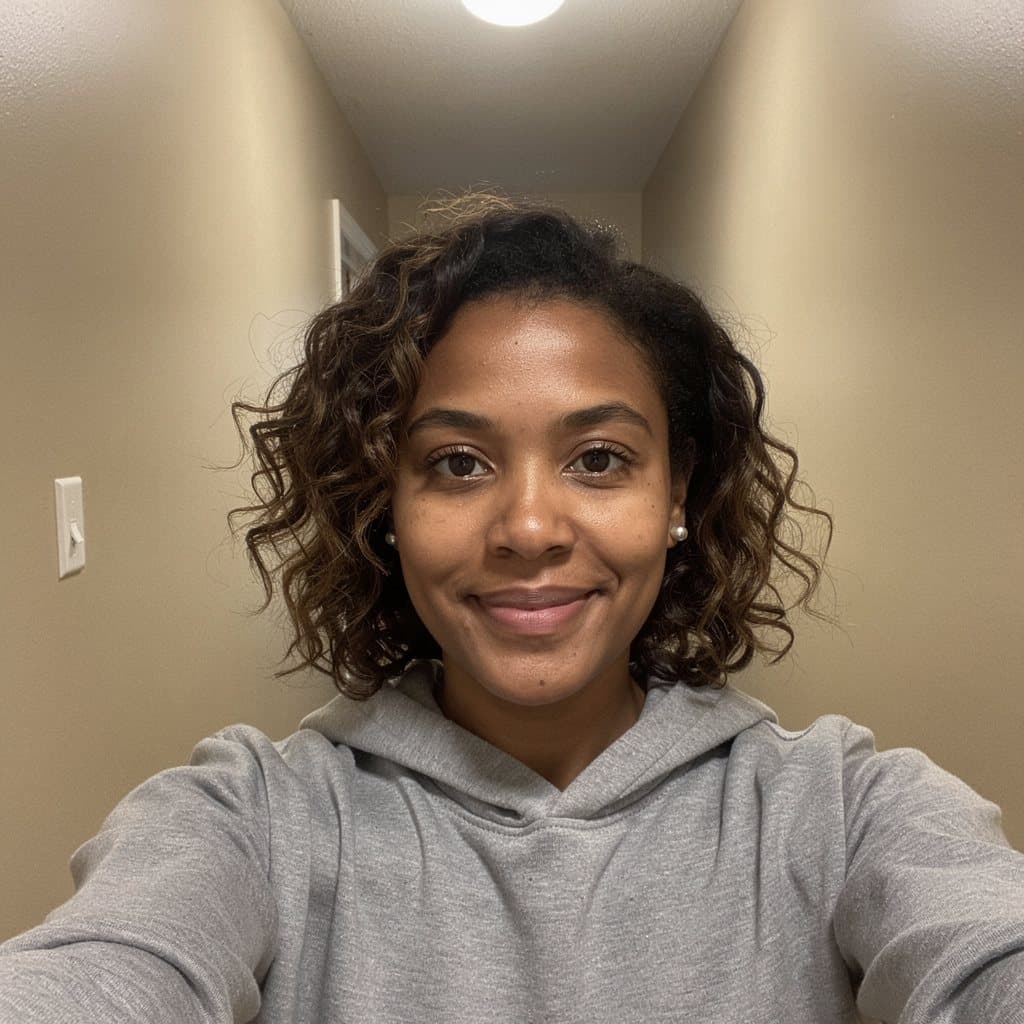
Before
After
Hallway selfie — beige wall to a Santa hat PFP
Edit instruction: “Turn this selfie into a Christmas profile picture with a Santa hat. Keep the same adult: the same face, apparent age, skin tone, hair color, expression, and eye direction. Do not turn them into a child, a celebrity, or a different person. Add one red velvet Santa hat with a white faux-fur brim and a white pom-pom. It sits naturally on the head, tilted slightly, the brim resting just above the eyebrows and following the hairline, lit by the same light as the face. Keep the clothes from the photo. Replace the background with soft, out-of-focus warm Christmas lights on a deep green wall. Frame it as a square profile picture: head and shoulders centered, the face large in the frame, with a little space above the hat so the pom-pom is not cut off. No text, no logos, no watermark. Do not add any known film, cartoon, game, or brand character.”
Changed: A red velvet Santa hat sits on her curls, and the hallway became a dark green wall with blurred Christmas lights.
Kept: Her face, smile, curls, silver studs, gray hoodie, and the arm-length selfie angle.
Limits: The background can come back as a tree instead of a plain wall of lights. If you want the wall only, say no Christmas tree.
Before
After
Matching set, first selfie — same prompt, green field
Edit instruction: “Turn this selfie into one half of a matching Christmas profile picture set. Keep the same adult: the same face, apparent age, skin tone, hair color, expression, and eye direction. Do not turn them into a child, a celebrity, or a different person. Add one red velvet Santa hat with a white faux-fur brim and a white pom-pom. It sits naturally on the head, tilted slightly, the brim resting just above the eyebrows and following the hairline, lit by the same light as the face. Keep the clothes from the photo. Use a solid pine-green background with small white snow dots and soft, even front light. Frame it as a square profile picture: head and shoulders centered, the face large in the frame, with a little space above the hat so the pom-pom is not cut off. Keep this exact framing, hat, and background so a second selfie edited with the same prompt matches it. No text, no logos, no watermark. Do not add any known film, cartoon, game, or brand character.”
Changed: Santa hat added and the hallway replaced with a flat pine-green field and small snow dots.
Kept: Her face, hair, earrings, hoodie, and the centered square framing.
Limits: The hat tilt is not fixed. In this run it leaned left; the second selfie leaned right, which happens to read as a pair.
Before
After
Matching set, second selfie — the same prompt, run again
Edit instruction: “Turn this selfie into one half of a matching Christmas profile picture set. Keep the same adult: the same face, apparent age, skin tone, hair color, expression, and eye direction. Do not turn them into a child, a celebrity, or a different person. Add one red velvet Santa hat with a white faux-fur brim and a white pom-pom. It sits naturally on the head, tilted slightly, the brim resting just above the eyebrows and following the hairline, lit by the same light as the face. Keep the clothes from the photo. Use a solid pine-green background with small white snow dots and soft, even front light. Frame it as a square profile picture: head and shoulders centered, the face large in the frame, with a little space above the hat so the pom-pom is not cut off. Keep this exact framing, hat, and background so a second selfie edited with the same prompt matches it. No text, no logos, no watermark. Do not add any known film, cartoon, game, or brand character.”
Changed: The street became the same pine-green field, and the same red hat was added.
Kept: His face, stubble, light-brown hair, navy coat, and gray T-shirt.
Limits: Two runs never match pixel for pixel. The green and the dot spacing can shift a little between the two pictures.
Before
After
Office selfie — glasses and bob to an original cartoon PFP
Edit instruction: “Redraw this selfie as an original cartoon Christmas profile picture in a soft, rounded 3D cartoon style with gentle shading. Keep this adult recognizable: the same hair color and hairstyle, skin tone, face shape, glasses or earrings if present, and the same smile or expression. Keep them an adult, not a child. Give them a red Santa hat with a white fur brim and a white pom-pom. Use a plain cranberry-red background with small white snow dots. Frame it as a square profile picture: head and shoulders centered, the face large in the frame, with a little space above the hat so the pom-pom is not cut off. No text, no logos, no watermark. Do not add any known film, cartoon, game, or brand character. Do not copy any animation studio's or film's character design.”
Changed: The photo became a rounded 3D cartoon with a Santa hat and a cranberry background with snow dots.
Kept: The black bob, round glasses, small earrings, mustard sweater, and closed-mouth smile.
Limits: Cartoon faces smooth out age and skin texture, and the glasses frames can change color. It is a likeness, not a portrait.
Before
After
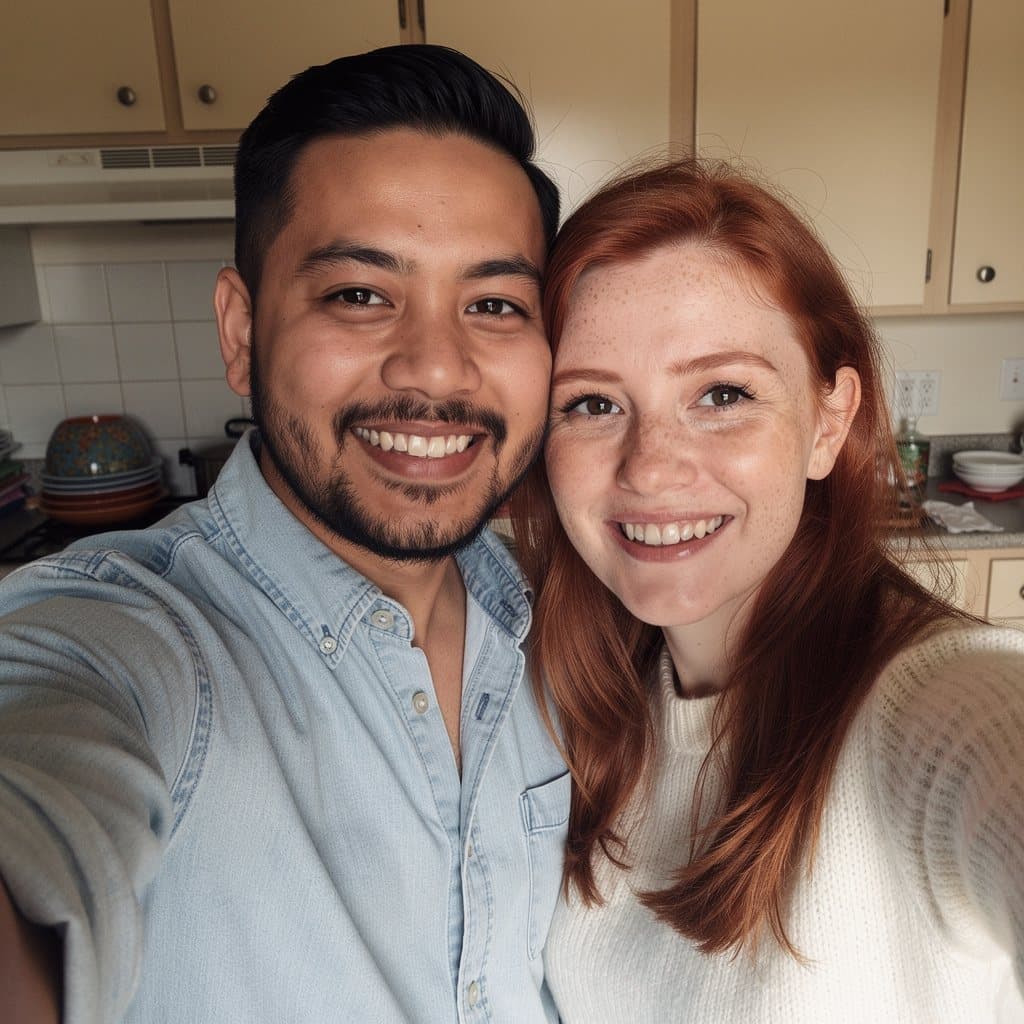
Kitchen couple selfie — two hats, one Christmas PFP
Edit instruction: “Turn this photo of two adults into a matching Christmas couple profile picture. Keep both people exactly as they are: the same faces, apparent ages, skin tones, hair, expressions, and where each person stands. Do not turn either person into a child, a celebrity, or a stranger. Do not merge them, swap them, or add a third person. Give each person the same red velvet Santa hat with a white faux-fur brim and a white pom-pom, sitting naturally on each head, and the same cream knit scarf. Replace the background with soft, out-of-focus warm Christmas lights. Frame it as a square picture with both faces large and both hats fully visible. No text, no logos, no watermark. Do not add any known film, cartoon, game, or brand character.”
Changed: Two matching Santa hats and cream scarves, and the kitchen became a blurred tree with warm lights.
Kept: Both faces, the beard, the freckles, the auburn hair, the smiles, and who stands on which side.
Limits: The scarves cover more of the clothes than you might want. Delete the scarf line if the shirt should show.
Before
After
Sidewalk selfie — gray street to a snowy evening
Edit instruction: “Turn this selfie into a snowy Christmas profile picture. Keep the same adult: the same face, apparent age, skin tone, hair color, expression, and eye direction. Do not turn them into a child, a celebrity, or a different person. Keep the clothes from the photo and add a soft cream knit scarf. Light snow falls in front of and behind the person, with a few flakes caught in the hair. The background is a cool blue winter evening with soft round bokeh and small white snow dots. Frame it as a square profile picture: head and shoulders centered and the face large in the frame. Do not add a hat or a beanie. No text, no logos, no watermark. Do not add any known film, cartoon, game, or brand character.”
Changed: Falling snow, a cream knit scarf, and a blue winter evening with soft bokeh replaced the street.
Kept: His face, hair, stubble, expression, and navy coat, with no hat added.
Limits: Snowflakes can land on the face. If one sits on an eye or the mouth, run again or ask for snow in the background only.
What this Christmas PFP maker does
A Christmas PFP is the holiday version of your profile picture. Most of the ones you find in search are pictures of strangers, cartoon characters you do not own, or aesthetic photos with nobody in them. This page does the other thing: you upload your own selfie and get your own face back, with a Santa hat on your hairline, snow in the air, a holiday background, or as an original cartoon. The result is a square JPEG sized for an avatar.
The look is a sentence you can read in the box, not a sticker you drag around. Santa hat is the default. Matching set is written so that two people running it on two separate selfies get the same hat, the same green field, and the same framing. Couple handles two adults who are already in one photo. Cartoon redraws the selfie in a rounded 3D style. Snowy and Cozy sweater skip the hat for something that still works in January.
It is an image edit, not a photo booth app. There are no stickers to place, no frames to pick, and no second upload for a hat or a partner. You get one image per generation. Photos of children are refused, including family photos where a child is in the frame, and so are requests to turn you into a known film or cartoon character.
How to make a Christmas PFP from your selfie
1
Upload one clear selfie
Use a JPG, PNG, or WebP of one adult, or of two adults for the couple preset, framed from the chest up with the face sharp. Leave some space above the head, because the Santa hat needs room. A photo with a cap, a hood up, or headphones gives the hat something to fight with. Take it off first if you can.
2
Pick a look, keep the square crop
Santa hat is filled in when the page opens. Matching set uses a flat green field so two separate selfies come out alike. Cartoon redraws you as an original 3D cartoon. Snowy adds a scarf and falling snow without a hat. The aspect ratio starts at 1:1 because profile pictures are shown in a square or a circle. You can change it in the toolbar.
3
Generate, check the face, then set it
A signed-out visit gets one Fast result after a human check. Your first 2 successful edits download without a watermark; after that, free downloads carry one. Look at the eyes, the hairline under the hat brim, and anything near the edges of the square before you upload it to Instagram, TikTok, Discord, or X. Most apps crop to a circle, so keep the face in the middle. Each extra look is another credit.
Making the Santa hat look like it belongs
A pasted-on hat is easy to spot: it floats above the hair, it is lit from a different side than the face, and the brim cuts straight across the forehead. The preset asks for the brim to rest just above the eyebrows and follow the hairline, and for the hat to take the same light as the face. That is why it works best on a photo where the top of the head is visible. If your selfie crops at the forehead, the model has to invent the top of your head and the hat, and the hairline under the brim is where that shows.
Hair matters more than people expect. Curls and loose hair should come out from under the brim at the sides. Short hair should be hidden by it. A high bun or a ponytail sits behind the hat, and the result is better if you mention it: say the bun stays behind the hat. Glasses stay on your face, and the brim sits above the frames. If the hat covers the glasses, say so and run again.
The default background is soft Christmas lights on a dark green wall, because a busy room behind a red hat looks cluttered at avatar size. If you want your real background, replace that sentence with keep the original background. If you want a different color, change deep green to navy, burgundy, or cream. Keep the rest of the sentence the same so the hat and the crop do not drift.
Matching and couple PFPs, two different jobs
Matching Christmas PFPs usually means two avatars that look like a set when they sit next to each other, one on each account. That takes two selfies and two generations. Each person runs the Matching set preset on their own photo and changes nothing. The flat pine-green field, the white snow dots, the same red hat, and the centered head-and-shoulders crop are what make them read as a pair. A blurred room or a different color on one side breaks the set.
The two results will not be identical. The hat can tilt left on one and right on the other, the green can shift a little, and the snow dots land in different places. On the samples above, the tilt happened to mirror. If you want them closer, run the second one again rather than rewriting the prompt. Edit the sentence only if you both agree on the change and both run the edited version.
A couple PFP is one picture of both of you. Use the Couple preset on a photo where both faces are large and both heads have room above them. The prompt keeps each person in place and puts the same hat and scarf on both. It does not merge two separate selfies into one frame, and it cannot add a person who is not in the upload. Friends and roommates work the same way as couples. A child in the photo means the upload is refused.
Christmas profile pictures this makes
A Santa hat PFP that still looks like you
The plain version: your face, your clothes, and a red hat with a white brim sitting on your actual hairline. It is the one most people mean when they search for a Santa hat PFP, and it is the default here because it changes the least.
Matching Christmas PFPs for two accounts
Each of you uploads your own selfie and runs the Matching set preset without editing it. The flat green field, the snow dots, and the hat repeat, so the two avatars read as a set when they sit next to each other in a chat or a follower list.
A couple photo with two hats
If you already have a photo together, the Couple preset puts the same hat and scarf on both of you in one square picture. It is for a shared account, a group chat icon, or a card-sized post, not for two separate profiles.
A cartoon Christmas PFP
Some people would rather not post a real face. Cartoon turns the selfie into an original rounded cartoon that keeps the hair, glasses, and sweater, so friends still recognize you. It is not a known character and the prompt says so.
A winter avatar without the hat
Snowy gives you falling snow, a scarf, and a cold blue evening. It reads as seasonal into January, after a Santa hat starts to look out of date, and it suits work profiles where a novelty hat feels like too much.
A quick swap for the holidays
Server icons, team chat avatars, and gaming profiles change for December and change back. Keep the original selfie, generate the Christmas version, and switch back in the new year without retaking anything.
Photo, crop, and fixes
Leave room above your head
Hold the phone a little further away or crop less. The hat and the pom-pom need space inside the square. A selfie cut off at the forehead makes the model guess the top of your head.
Take off caps and hoods
A beanie, a baseball cap, or a hood gives the model two hats to resolve. It either stacks them or blends them into one strange shape. Start from a bare head.
Face the camera, face the light
A window in front of you or to the side works. Strong light from behind makes the face dark and the hat glow. Avatars are small, so the eyes need to be clear.
Keep it square
The ratio starts at 1:1. If you switch to Keep original on a tall phone photo, the app will crop it later anyway and may cut the hat. Square is the safest choice for a profile picture.
Change one thing at a time
To get a navy background, change only the color words. To lose the scarf, delete only the scarf. Rewriting the whole preset is how the face starts to drift.
Check it at thumbnail size
Before you post, look at it small. A busy background, snow on the face, or a hat that hides your eyes looks worse at 40 pixels than at full size.
What a holiday edit can get wrong
The face can drift. Skin gets smoother, eyes change shape slightly, or an expression softens. The presets say to keep the same person, and on a sharp, well-lit selfie that usually holds. On a dark or blurry photo it does not. If the result looks like a relative rather than you, try a clearer photo instead of adding more words.
The hat can go wrong in small ways: a brim that floats, a pom-pom cut off by the square, a second hat appearing on a couple photo where one head was turned away, or snowflakes landing on the face in the Snowy preset. Cartoon results simplify on purpose and can change the color of glasses or earrings. A finished image that missed counts as a generation. A timeout or a model error refunds the credit.
This page makes one flattened JPEG from one image. It does not combine two selfies into one picture, does not make an animated avatar, and does not post to your account. Sexual content, sexual content involving minors, violence or gore, hate, impersonation of a real person, and copyright or trademark infringement are refused. The full list is on the acceptable use page. A child in the photo is refused even if an adult is also in the frame.
What a free Christmas PFP includes
Your first Christmas PFP can be one signed-out Fast edit after a human check. It uses Fast, and like your first 2 successful edits overall, it downloads without a watermark. Another generate from the same browser opens sign-in. Creating an account adds 5 credits once you create an account, still on Fast; downloads after the first 2 edits carry a watermark. A free account runs one generation at a time.
A matching set is two generations, one per selfie. A cartoon and a Santa hat version of the same photo are also two. Paid plans start at $19 a month for 20 products (100 credits), download without the watermark, unlock Balanced and High Quality, and join the priority queue. A run that fails or returns no image refunds its credit.
There are three ways people get a Christmas profile picture: save one from a gallery, drag a hat sticker onto a selfie, or have the edit made from the photo. Each one gives you something different to post.
Christmas PFP maker compared with PFP galleries and hat sticker apps
Approach
You start with
You get
This Christmas PFP maker
Your own selfie and a preset
Your face with a hat, lit and placed on the hairline, square
A Christmas PFP gallery
Nothing of your own
Someone else’s photo or a drawing many people already use
A Santa hat sticker app
Your selfie and a hat graphic
A flat hat you size and rotate by hand, background unchanged
Matching set, run twice
Two separate selfies
Two avatars with the same hat, field, and crop
A named character request
A film or cartoon title in the prompt
Refused. The cartoon has to be an original likeness
Example prompts
Santa hat
Turn this selfie into a Christmas profile picture with a Santa hat. Keep the same adult: the same face, apparent age, skin tone, hair color, expression, and eye direction. Do not turn them into a child, a celebrity, or a different person. Add one red velvet Santa hat with a white faux-fur brim and a white pom-pom. It sits naturally on the head, tilted slightly, the brim resting just above the eyebrows and following the hairline, lit by the same light as the face. Keep the clothes from the photo. Replace the background with soft, out-of-focus warm Christmas lights on a deep green wall. Frame it as a square profile picture: head and shoulders centered, the face large in the frame, with a little space above the hat so the pom-pom is not cut off. No text, no logos, no watermark. Do not add any known film, cartoon, game, or brand character.
Matching set
Turn this selfie into one half of a matching Christmas profile picture set. Keep the same adult: the same face, apparent age, skin tone, hair color, expression, and eye direction. Do not turn them into a child, a celebrity, or a different person. Add one red velvet Santa hat with a white faux-fur brim and a white pom-pom. It sits naturally on the head, tilted slightly, the brim resting just above the eyebrows and following the hairline, lit by the same light as the face. Keep the clothes from the photo. Use a solid pine-green background with small white snow dots and soft, even front light. Frame it as a square profile picture: head and shoulders centered, the face large in the frame, with a little space above the hat so the pom-pom is not cut off. Keep this exact framing, hat, and background so a second selfie edited with the same prompt matches it. No text, no logos, no watermark. Do not add any known film, cartoon, game, or brand character.
Cartoon
Redraw this selfie as an original cartoon Christmas profile picture in a soft, rounded 3D cartoon style with gentle shading. Keep this adult recognizable: the same hair color and hairstyle, skin tone, face shape, glasses or earrings if present, and the same smile or expression. Keep them an adult, not a child. Give them a red Santa hat with a white fur brim and a white pom-pom. Use a plain cranberry-red background with small white snow dots. Frame it as a square profile picture: head and shoulders centered, the face large in the frame, with a little space above the hat so the pom-pom is not cut off. No text, no logos, no watermark. Do not add any known film, cartoon, game, or brand character. Do not copy any animation studio's or film's character design.
Snowy
Turn this selfie into a snowy Christmas profile picture. Keep the same adult: the same face, apparent age, skin tone, hair color, expression, and eye direction. Do not turn them into a child, a celebrity, or a different person. Keep the clothes from the photo and add a soft cream knit scarf. Light snow falls in front of and behind the person, with a few flakes caught in the hair. The background is a cool blue winter evening with soft round bokeh and small white snow dots. Frame it as a square profile picture: head and shoulders centered and the face large in the frame. Do not add a hat or a beanie. No text, no logos, no watermark. Do not add any known film, cartoon, game, or brand character.
Couple
Turn this photo of two adults into a matching Christmas couple profile picture. Keep both people exactly as they are: the same faces, apparent ages, skin tones, hair, expressions, and where each person stands. Do not turn either person into a child, a celebrity, or a stranger. Do not merge them, swap them, or add a third person. Give each person the same red velvet Santa hat with a white faux-fur brim and a white pom-pom, sitting naturally on each head, and the same cream knit scarf. Replace the background with soft, out-of-focus warm Christmas lights. Frame it as a square picture with both faces large and both hats fully visible. No text, no logos, no watermark. Do not add any known film, cartoon, game, or brand character.
Cozy sweater
Turn this selfie into a cozy Christmas profile picture. Keep the same adult: the same face, apparent age, skin tone, hair color, expression, and eye direction. Do not turn them into a child, a celebrity, or a different person. Dress them in an original red-and-cream knit Christmas sweater with a simple snowflake and pine-tree pattern, no words on it. Replace the background with a softly blurred living room with a warm fireplace glow and a lit Christmas tree. Frame it as a square profile picture: head and shoulders centered and the face large in the frame. Do not add a hat or a beanie. No text, no logos, no watermark. Do not add any known film, cartoon, game, or brand character.
Why use Remorphy
Made from your photo, not a stock avatar
Galleries of Christmas profile pictures are someone else’s face or a drawing anyone can save. This page starts from your selfie, so the result is your face with the hat added.
Square from the start
The editor opens on a 1:1 ratio and the presets ask for a centered head and shoulders with room above the hat, so the circle crop on most apps does not cut the pom-pom or your chin.
Presets you can read and edit
Every look is a sentence in the box. Change the green to navy, remove the scarf, or ask for a reindeer headband instead of a hat. Nothing is hidden behind a filter name.
Frequently asked questions
What is a Christmas PFP?
PFP means profile picture. A Christmas PFP is the holiday version of the avatar you already use: usually a Santa hat added to a selfie, sometimes snow, a holiday background, a cartoon version of you, or a matching pair with a partner or friend. This page makes it from your own photo instead of picking a stranger’s from a gallery.
How do I put a Santa hat on my profile picture?
Upload the selfie, keep the Santa hat preset, and generate. The prompt places one red velvet hat with a white brim on your hairline, matches it to the light on your face, and swaps the background for blurred Christmas lights. If you want to keep your real background, replace that sentence with keep the original background.
How do we make matching Christmas PFPs?
Each person uploads their own selfie and runs the Matching set preset without changing a word. Same hat, same green field, same snow dots, same square framing. The two results will be close but not identical: the hat can tilt a different way and the green can shift slightly. If you are in one photo together, use the Couple preset instead.
Can I make a cartoon Christmas PFP of myself?
Yes. The Cartoon preset redraws the selfie as an original rounded 3D cartoon and keeps your hair, skin tone, glasses, and clothes as the likeness. It does not copy a studio’s style or a film character, and requests for a named character are refused. Expect smoother skin and simpler details than the photo.
Is the free Christmas PFP watermarked?
Not the first ones. Your first 2 successful edits download without a watermark, signed in or not. After that, free downloads use Fast and include a small Remorphy watermark in the bottom-right corner. A paid plan, or a bought credit pack, downloads without it.
What size should a Christmas PFP be?
Square. The editor here starts on 1:1 and returns a 1024 by 1024 JPEG, which is larger than Instagram, TikTok, Discord, or X display it. Those apps shrink it and usually crop to a circle, which is why the presets keep your face centered with space above the hat.
What is a Santa hat PFP?
It is your profile picture with a Santa hat added: a red hat with a white fur brim and a pom-pom, usually worn tilted. People switch to one in December and back in January. Here the hat is generated on your own selfie, fitted to your hairline and the light in the photo, rather than pasted on as a flat sticker.
Can I keep my real background?
Yes. The presets replace the background because a cluttered room looks messy at avatar size, but that is one sentence. In the Santa hat preset, replace the line about Christmas lights on a green wall with keep the original background. Leave the rest alone so the hat and the crop stay the same.
Can I upload two selfies to make one couple picture?
No. Each generation uses one photo. For one picture of both of you, start from a photo you are both in and use the Couple preset. For two matching avatars, each of you runs the Matching set preset on your own selfie.
Can I make a Christmas PFP of my kids or my family?
No. Photos with a child in them are refused, including family photos with adults in the frame. The presets are written for adults in photos they have the right to edit. Two adults together work with the Couple preset.
Can I make a Christmas PFP of my dog or cat?
The presets are written for people, but you can edit the sentence: replace the person lines with keep the same dog, the same fur color, markings, and face, and keep the Santa hat line. Pets often move the hat to the ears or turn it into a headband. That is a separate run.
Does this work for Instagram, TikTok, Discord, and X?
Yes. You download a square JPEG and upload it yourself in each app’s profile settings. Remorphy does not connect to your accounts or post for you. Each app shows the avatar as a small circle, so check that your face is centered and the hat is not clipped.
Can I add reindeer antlers or an elf hat instead?
Yes. Replace the Santa hat sentence with what you want, for example a soft brown reindeer antler headband, or a green felt elf hat with a small bell. Describe the object itself. Do not name a film or a character to steer it; those requests are refused.