The first slide of the carousel
The perdon trend opens on a photo that looks a little too good, then ends on the real one. This editor is that opening frame: one everyday picture in, one over-perfect JPEG out.
Upload one everyday photo and get the over-perfect half of the perdon trend — also called Perdón IA foto and AI vs realidad.
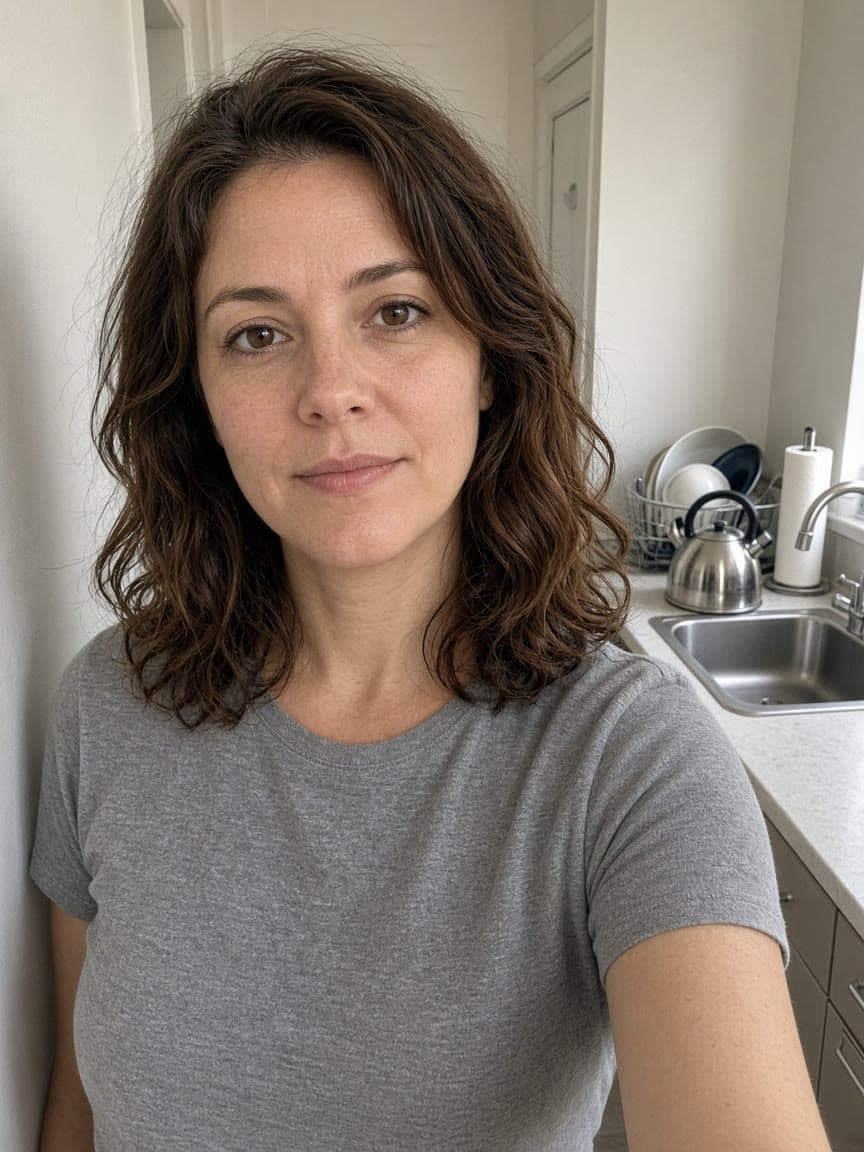
Before

After
Edit instruction: “Edit this everyday photo of the adult already in the frame into an over-perfect AI vs reality photo. Keep the same face, identity, apparent age, hair color, body shape and size, expression, pose, and camera angle. Do not make them slimmer, taller, more muscular, or a different person. Do not turn the subject into a child, a celebrity, or a stranger. Upgrade the place to a polished dream location, with flattering editorial light, salon-finished hair in the same color and length, and a refined version of the wardrobe. Do not add or remove people. No text.”
Changed: The kitchen and gray t-shirt become a sea terrace and a cream silk blouse, with salon-finished chestnut hair and golden-hour light.
Kept: The waist-up framing, the hair color, and the look toward the camera stay in the result.
Limits: The face can drift even when the prompt locks identity. If it looks like someone else, use a sharper photo with the face larger in the frame and run again.
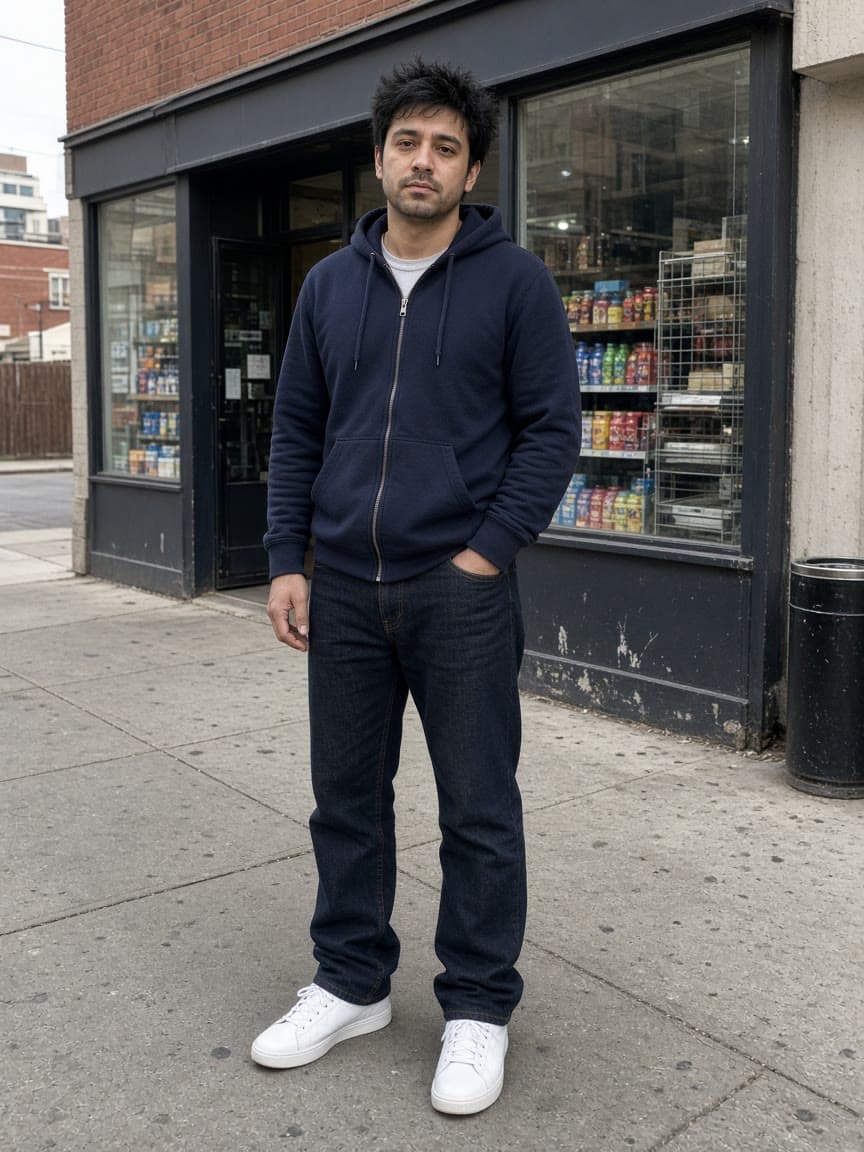
Before

After
Edit instruction: “Edit this full-body photo of the adult already in the frame into an over-perfect AI vs reality photo. Keep the same face, identity, apparent age, hair color, body shape and size, expression, pose, and camera angle. Do not make them slimmer, taller, more muscular, or a different person. Do not turn the subject into a child, a celebrity, or a stranger. Move the setting to a quiet luxury rooftop at dusk with distant city lights, salon-neat hair in the same color, and a tailored dark layer. Do not add people. No text.”
Changed: The convenience-store sidewalk becomes a quiet rooftop at dusk, and the hoodie becomes a dark tailored layer.
Kept: The full-body stand, one hand in a pocket, and the short black hair stay recognizable. The other hand holds a glass.
Limits: A hand can leave the pocket, and the jacket can look more formal than a polished hoodie. Say to keep the hand placement if the pose is the joke.
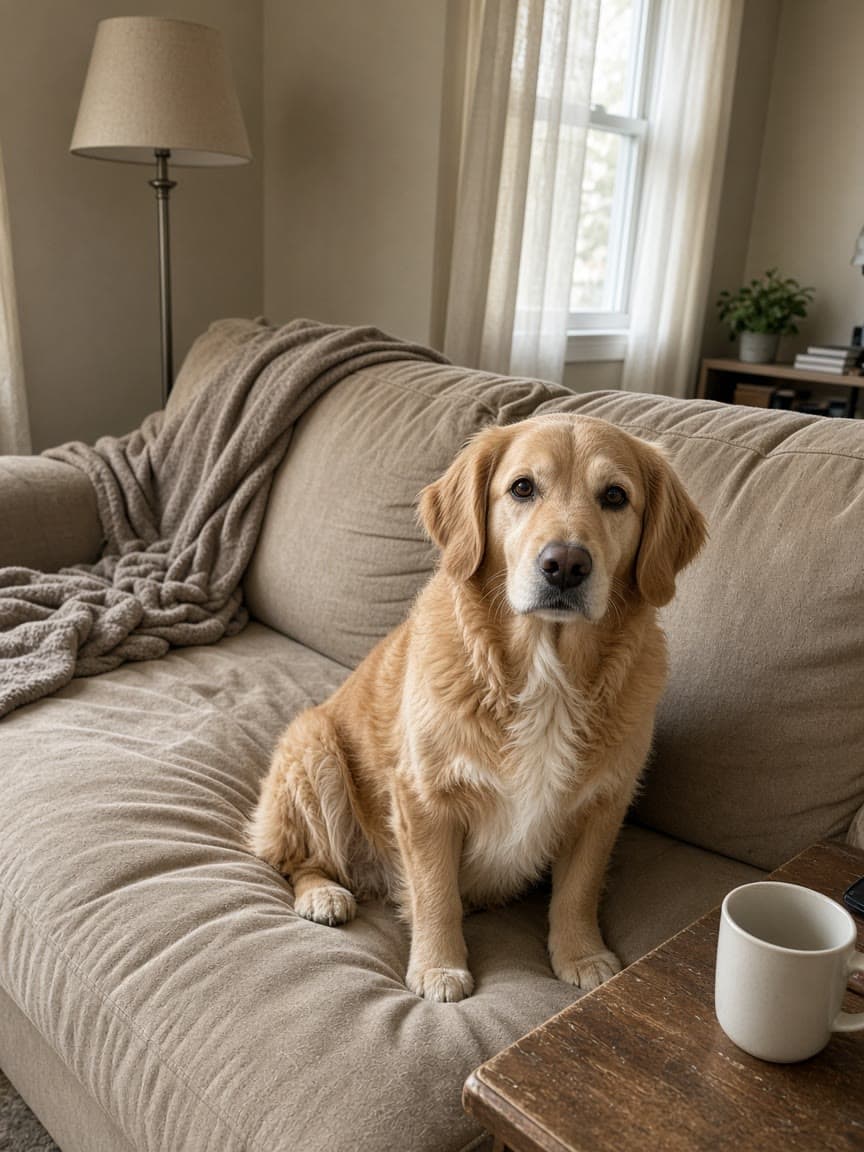
Before
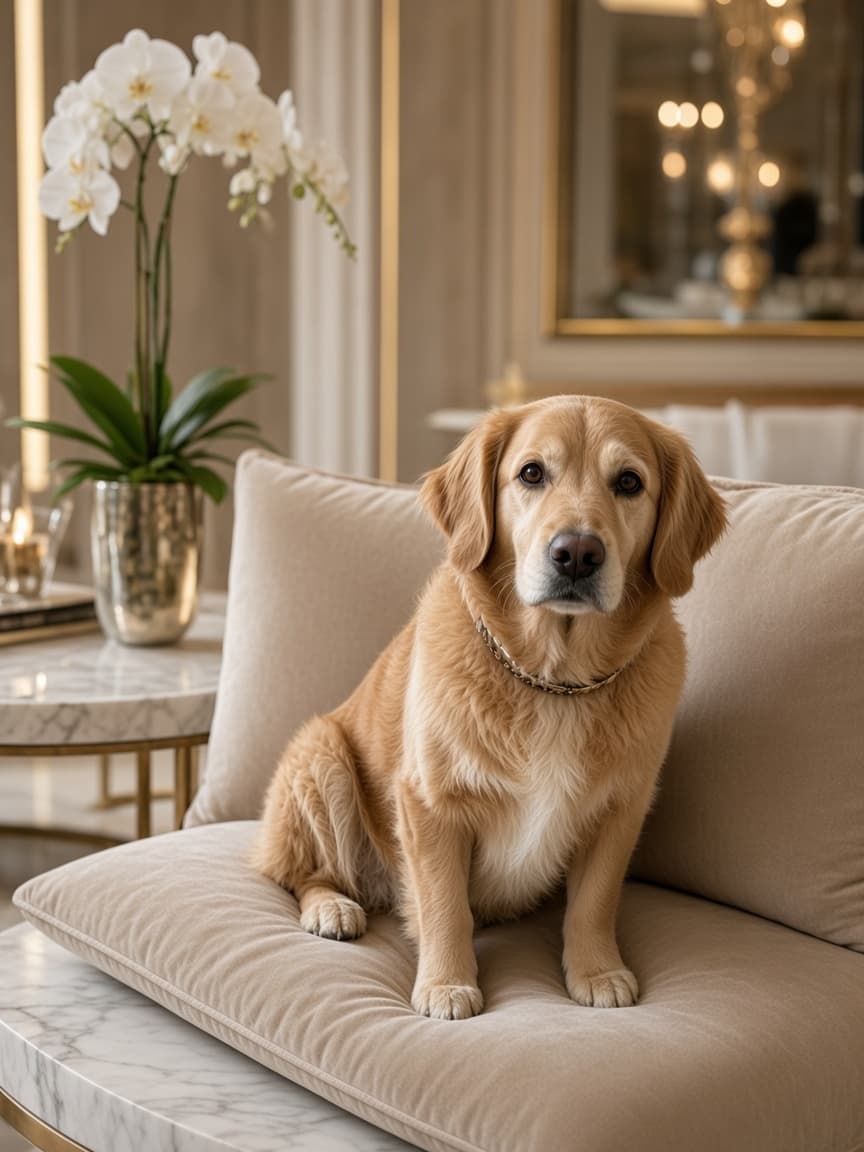
After
Edit instruction: “Edit this photo of the dog or cat already in the frame into an over-perfect AI vs reality photo. Keep the same animal, face, fur colors, markings, body shape, pose, and camera angle. Do not change the breed. Do not add animals or people. Groom the coat and place the pet in a glamorous setting with soft editorial light. No text.”
Changed: The rumpled couch becomes a marble lounge with a velvet cushion, the coat looks groomed, and a simple collar appears.
Kept: The apricot-gold coat, white chest, floppy ears, and sitting pose stay in the frame.
Limits: A collar or cushion can show up even if the sentence did not name them. A second pet in the same photo is not what this preset describes.
An AI vs reality photo is the over-perfect first slide of the perdon trend, a TikTok carousel joke that spread in Argentina and Mexico in mid-October 2026. People also search for it as the perdón trend, Perdón IA foto, and AI vs realidad. Slide one is an everyday photo edited until the place, the light, the hair, and the clothes look too good, often captioned “esta soy yo” (this is me). Optional middle slides walk those exaggerations back one at a time. The last slide is the untouched photo with a single word: “perdón” (sorry).
Remorphy makes only that perfect half, from one photo you already took and a prompt you can read. It does not photograph the real scene again, write the captions, or post the carousel. You keep the original file and publish the sequence yourself. The edit starts from the picture in the upload. It is not a portrait drawn from a blank description, not a second reference image, and not a video.
The You preset is for one adult already in the frame. It is written to keep the same face, apparent age, hair color, body shape, pose, and camera angle, and to upgrade the setting, the light, the grooming, and the wardrobe. The Pet preset does the same job for one dog or one cat already in the photo. This is not the separate 1980s nostalgia photo trend, and it is not a sheet-ghost costume. Children, celebrities, and strangers are out of bounds.
1
Use a JPG, PNG, or WebP of one adult, or of one dog or cat. The face should be visible in normal light. A selfie or a full-body frame both work for a person. For a pet, include the face and the body. A plain room, a sidewalk, or a lived-in couch is a better start than a picture that is already a studio shoot. One image is the whole input.
2
You is filled in when the page opens. It keeps the adult’s face, apparent age, hair color, body shape, pose, and camera angle, and it upgrades the place, the light, the hair finish, and the wardrobe. Pet does that job for the dog or cat already in the photo. Edit the sentence if you want a named place, such as a rooftop at dusk or a luxury living room. The other example prompts lower on this page are those variants.
3
A signed-out visit can run one Fast result after a human check. The download is watermarked until a paid plan. Save it as slide one and caption it in your own words, often “esta soy yo” plus the place the edit invented. Middle slides are optional: each one walks back a single exaggeration, or you skip them. The last slide is your original photo, not a new generation, with the single word “perdón”. Remorphy does not print that word on the image and does not upload the carousel.
Publish a photo carousel, not a single image. Slide one is the JPEG from this page. Write a short line on that slide in the app you post to, commonly “esta soy yo” plus the place the edit invented, such as a terrace, a rooftop, or a dressed-up living room. Remorphy does not paint those words onto the picture. If the platform asks you to label AI media, leave that label on. The joke depends on people knowing the first frame is too good.
Middle slides are optional. Each one takes back a single exaggeration: the hair was not salon-finished, the room was not that grand, the clothes were the hoodie from the original. Some posts use “mentira” (lie) for that step. You can make a milder edit for a middle slide by shortening the prompt, or you can skip straight from the perfect frame to the real one. Many carousels are only two or three slides.
The last slide is the file you uploaded, shown as itself, with the caption “perdón” and nothing else. Do not run that photo through the editor again. Do not ask the model to stamp the word onto the pixels. Add whatever sound the current posts are using inside TikTok or Reels. This editor does not supply audio. Keep the joke about a photo you have the right to post: your own, or your own pet, with a yes from anyone else who is recognizable in the frame.
The perdon trend opens on a photo that looks a little too good, then ends on the real one. This editor is that opening frame: one everyday picture in, one over-perfect JPEG out.
A sidewalk, a kitchen, or a gym snapshot can be the source when the whole body is in frame. The pose and the camera angle are supposed to survive so friends still see it is the same shot.
Pet is for one animal already in the file. The coat gets a groomed finish and the room gets a glamorous setting. The breed, markings, and sit or stand stay. It does not invent a person beside the pet.
Some carousels put a quieter edit between the perfect frame and the real photo. Run the same upload again with a shorter ask — salon hair only, or the new room only — if you want that middle slide. Each run is its own generation.
The punchline works because the last photo is yours and the first one is obviously polished. Use a photo you have the right to post. Do not build the carousel from someone who did not agree to it.
TikTok, Reels, and a photo carousel are where the sequence is published. This page returns one image. It does not add music, captions, or a second picture of the real scene.
The last slide and the upload should be the same file. A living room, a bus stop, a kitchen, or a couch makes the jump to a dream location readable. A photo that is already a campaign still leaves little for the edit to exaggerate.
For You, keep the face large enough to recognize, without sunglasses or a hat over the eyes. For Pet, keep the eyes, ears, and coat markings clear. Flat window light beats a hard flash that blows the face out.
The side-by-side is funny when the stance and the camera angle match. Say so in the prompt, and do not ask for a new gesture. If a hand jumps, name where the hand was and run again.
You expects one adult. Pet expects one dog or one cat. A selfie of a person will not reliably grow a dog, and a pet photo will not reliably grow an owner. Photograph the subject you want edited.
The You sentence forbids a slimmer, taller, or more muscular result, and it forbids a different person. Delete that lock only if you are willing to lose the joke. The gap should be the place and the polish.
“Esta soy yo” and “perdón” belong on the post, not in the pixels. The presets end with “No text” so the model does not letter the joke onto the photo.
The prompt can still miss. A face can shift, an apparent age can drift, hair can change length, and a body can come back slimmer or broader than the upload. A hand can leave a pocket. When the likeness is wrong, do not keep stacking adjectives. Use a sharper photo, repeat the lock in a shorter sentence, and generate again. That second run spends another credit.
Children are refused, including a child next to an adult you meant to edit. Celebrities and other real public figures are refused. A stranger who did not agree to the edit is the wrong subject, and the prompt tells the model not to turn the person into someone else or to add people who were not in the frame. Pet edits can still swap a breed or invent a collar. One animal, with the face and coat clearly visible, is the reliable start.
This page returns one flattened JPEG. It does not make the middle slides for you, does not typeset “perdón”, and does not export a video. Sexual content, violence or gore, hate, child sexual abuse, impersonation of a real person, and copyright or trademark infringement are refused. The full list is on the acceptable use page. A sheet-ghost costume is AI Ghost Photoshoot. A hollow-neck clothing still is Ghost Mannequin. A 1980s film grade is a different trend and a different prompt.
The perfect half can start as one signed-out Fast edit after a human check. That download is watermarked and uses Fast. Another generate from the same browser opens sign-in. Creating an account adds 5 credits once you create an account, still on Fast, still watermarked. While signed in you can claim a daily credit (3 a day for the first 7 UTC days, then 1, expiring the same UTC day). That daily credit expires the same UTC day and is not merged into a paid balance. A free account runs one generation at a time.
You and Pet are separate generations, and a named place such as the rooftop prompt is another generation on top of those. Basic is $12 a month or $96 a year for 300 credits a month. Pro is $29 or $232 for 750. Ultra is $59 or $472 for 5,000. Yearly billing charges once and refills that monthly amount; unused credits that month do not roll over. A paid plan removes the watermark, unlocks Balanced and High Quality, enters the priority queue, and can run two jobs at once. Timeouts, model errors, and missing images return the credit. Cancelling after the model has accepted the job does not. Free files last 7 days and paid files last 30. The history entry remains and is marked Expired.
The perdon trend needs two pictures: the polished one and the real one. This editor supplies the polished one. You already have the real one. A nostalgia grade and a sheet costume are other pages.
| Approach | You start with | You get |
|---|---|---|
| This AI vs reality photo | One everyday photo and a prompt | The over-perfect half only |
| The carousel you post | That JPEG plus your original file | Slide one, then “perdón” on the real photo |
| A video template | A clip and a soundtrack | Not this editor — still images only |
| A 1980s nostalgia edit | A portrait and a retro grade | A different trend, not the perdon carousel |
| A description with no photo | Text and an empty canvas | Not a match for the face you already shot |
Edit this everyday photo of the adult already in the frame into an over-perfect AI vs reality photo. Keep the same face, identity, apparent age, hair color, body shape and size, expression, pose, and camera angle. Do not make them slimmer, taller, more muscular, or a different person. Do not turn the subject into a child, a celebrity, or a stranger. Upgrade the place to a polished dream location, with flattering editorial light, salon-finished hair in the same color and length, and a refined version of the wardrobe. Do not add or remove people. No text.
Edit this photo of the dog or cat already in the frame into an over-perfect AI vs reality photo. Keep the same animal, face, fur colors, markings, body shape, pose, and camera angle. Do not change the breed. Do not add animals or people. Groom the coat and place the pet in a glamorous setting with soft editorial light. No text.
Edit this everyday photo of the adult already in the frame into an over-perfect AI vs reality photo. Keep the same face, identity, apparent age, hair color, body shape and size, expression, pose, and camera angle. Do not make them slimmer, taller, more muscular, or a different person. Do not turn the subject into a child, a celebrity, or a stranger. Replace the room with a bright luxury living room, warm lamps, and a softly blurred background. Finish the hair at a salon in the same color and length, and refine the wardrobe. Do not add people. No text.
Edit this full-body photo of the adult already in the frame into an over-perfect AI vs reality photo. Keep the same face, identity, apparent age, hair color, body shape and size, expression, pose, and camera angle. Do not make them slimmer, taller, more muscular, or a different person. Do not turn the subject into a child, a celebrity, or a stranger. Move the setting to a quiet luxury rooftop at dusk with distant city lights, salon-neat hair in the same color, and a tailored dark layer. Do not add people. No text.
Edit this photo of the adult already in the frame into an over-perfect AI vs reality photo. Keep the same face, identity, apparent age, hair color, body shape and size, expression, pose, and camera angle. Do not make them slimmer, taller, more muscular, or a different person. Do not turn the subject into a child, a celebrity, or a stranger. Place them on a quiet stylish street at golden hour, with editorial light, salon-polished hair in the same color, and a neat version of the outfit. Do not add people. No text.
The trend is a confession, not a replacement portrait. Remorphy edits the perfect half. You still have the original file for the last slide.
You and Pet are the starting sentences. Luxury room, rooftop dusk, and golden-hour street are the same identity lock with a named place. You can rewrite any of them before Generate.
The sentence on the generator says what must stay and what may be upgraded. Read it before you spend a credit. There is no hidden one-tap prompt.
It is a TikTok carousel joke from Argentina and Mexico in mid-October 2026. The first slide is an over-perfect AI version of an everyday photo, often captioned “esta soy yo”. Optional middle slides walk the exaggerations back. The last slide is the real photo with the word “perdón”, Spanish for sorry. People also call it the perdón trend, Perdón IA foto, and AI vs realidad.
No. It makes the perfect half from one upload. You post the carousel yourself: the edit first, your original photo last, with “perdón” as the last caption. The editor does not burn text into the picture, add a soundtrack, or publish the post.
That is what the You prompt asks for: the same face, apparent age, hair color, body shape and size, pose, and camera angle. It is not supposed to make you slimmer, taller, or more muscular, or to replace you with a different person. Likeness can still drift. If it does, start from a clearer photo and run again.
Yes, when that one pet is already in the photo. Choose Pet. It keeps the animal, the markings, the body, and the pose, grooms the coat, and moves the setting. It does not add a person or a second animal.
No. The 1980s nostalgia edit is a different look: retro clothes, film grain, and an old-photograph grade. This page is the perdon trend, also called an AI vs reality photo. The point is a too-perfect present-day picture, then the real one with “perdón”.
Perdón IA foto is the Spanish name for this same joke. Perdón means sorry, and IA means AI. It is the photo version of the perdon trend: an AI picture that looks too perfect, then the real photo. On this page the English name is AI vs reality photo. The editor and the presets are the same either way.
AI vs realidad is the Spanish wording of AI vs reality. In this trend it means the polished AI frame set against the real photograph, not a general argument about artificial intelligence. Searching AI vs realidad, perdón trend, or perdon trend should land on this same edit.
On the first slide, a line such as “esta soy yo” and the place the edit shows. On a middle slide, one correction, such as that your hair was not salon-finished or that you were not in that room. On the last slide, only “perdón”, over your original photo. The editor does not typeset those lines.
No. The You preset is for an adult in a photo you have the right to edit, and it tells the model not to turn that person into a child, a celebrity, or a stranger. Those uploads are also refused by the acceptable use rules. Pet is for your own dog or cat, not a random animal from the web.
The last slide has to undercut the first one. If the upload is already glamorous, the edit has nowhere honest to go, and the “perdón” does not land. A plain room or a sidewalk gives the dream location something to replace.
Yes. The signed-out image and free-account downloads include a Remorphy watermark. A paid plan downloads the same kind of edit without it. The watermark is not the word perdón, and the editor will not print perdón on the photo for you.
Treat that result as a miss. The credit for a failed or timed-out job comes back; a finished image that merely looks unlike you does not, because the model did return a picture. Upload a clearer photo of the same adult, keep the identity sentences, and generate again. Do not use the miss as a portrait of someone else.